Products
Maintain a catalog of the products and services you sell so you can add them to quotes and invoices with consistent pricing.
Overview
The Products module lets you:
- Build a reusable catalog of services, physical products, subscriptions, and labor
- Set a sale price and an optional cost for each item to track margin
- Assign a billing cycle to recurring items
- Mark items as taxable
- Optionally track stock levels for physical products
- Activate or deactivate items without deleting them
Products is part of the Billing section, which is available on plans with the usage-based billing feature enabled. Reading the catalog requires the products read permission; creating, editing, deleting, and adjusting stock require the matching write permissions.
Navigate to Products
Go to Billing → Products in the left sidebar (/products).
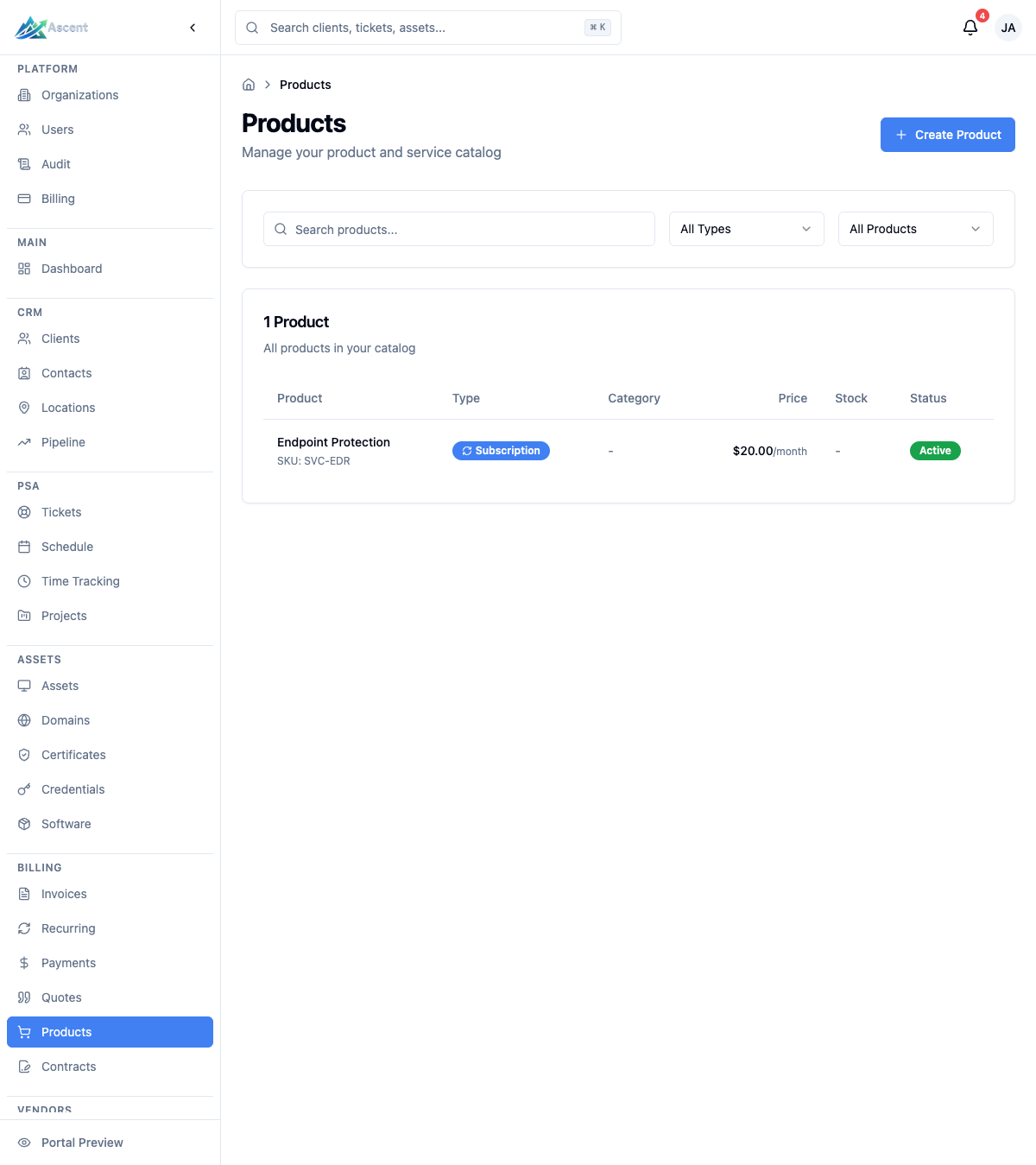
Product list
The list shows the total product count and the following columns:
| Column | Description |
|---|---|
| Product | Name, SKU (if set), and a one-line description |
| Type | Service, Product, Subscription, or Labor |
| Category | Free-text category, if one was entered |
| Price | Sale price, with the billing cycle suffix (for example /month) on recurring items |
| Stock | Current stock quantity when inventory tracking is enabled; a warning icon appears when stock is at or below the low-stock threshold |
| Status | Active or Inactive |
Filtering and search
- Search products by name (search box).
- Type filter: All Types, Service, Product, Subscription, Labor.
- Status filter: All Products, Active, Inactive.
The list is paginated 25 rows per page. Click a row or the product name to open its detail page.
Product types
Choose a type when creating a product:
| Type | Use for |
|---|---|
| Service | Professional services and consulting |
| Product | Physical or digital products |
| Subscription | Recurring service or product (a billing cycle is required) |
| Labor | Hourly or time-based work |
Creating a product
- Click Create Product.
- Under Basic Information, fill in:
- Name (required)
- SKU (optional unique identifier)
- Category (optional free-text label)
- Description (optional)
- Under Type & Billing:
- Product Type — Service, Product, Subscription, or Labor.
- Billing Cycle — leave empty for one-time items. For Subscription items a cycle is required.
- Taxable — toggle on to apply tax to this item (on by default).
- Under Pricing:
- Price (required) — what you charge.
- Cost (optional) — what the item costs you.
- Margin — calculated automatically from price and cost; it is read-only.
- Under Inventory (optional):
- Toggle Track Inventory to enable stock tracking.
- When enabled, set Initial Stock and a Low Stock Threshold.
- The Preview panel on the right updates as you type. Click Create Product to save.
Billing cycles
When a product is recurring, pick one of these cycles: Weekly, Bi-weekly, Monthly, Quarterly, Semi-annual, or Annual. One-time products have no cycle.
Pricing and margin
Each product has a single Price and an optional Cost. When a cost is set, Ascent shows the Margin as a percentage: (price − cost) / price. There is no tiered or volume pricing — quantity is applied when the item is added to a quote or invoice.
Inventory tracking
Inventory tracking is optional and intended for physical products.
- Enable Track Inventory on the product to expose stock fields.
- Current Stock and Low Stock Threshold appear on the product detail page.
- When current stock is at or below the threshold, a low-stock warning is shown in the list and on the detail page.
Adjusting stock
On a product that tracks inventory, open the detail page and click Update Stock, then choose an operation:
| Operation | Effect |
|---|---|
| Add to stock | Increases current stock by the entered quantity |
| Subtract from stock | Decreases current stock by the entered quantity |
| Set stock to | Replaces current stock with the entered quantity |
The product detail page
Opening a product shows:
- Product Details — type, status, taxable badge, SKU, category, billing cycle, description, and creation date.
- Pricing — price, cost, and margin.
- Inventory — current stock and low-stock threshold, plus the Update Stock dialog (only when inventory tracking is enabled).
- Actions — Activate Product / Deactivate Product and Edit Product.
- Summary and Details panels with key fields, timestamps, and the product ID.
From the header you can Edit the product or Delete it (a confirmation dialog appears). If the product has been used on an invoice it is soft-deleted (set to inactive rather than removed); otherwise it is permanently deleted.
Using products on quotes and invoices
Catalog products can be selected as line items when building quotes and invoices, and on contract line items. The product's price flows through as the line price, and quantity is set on the line. For details, see the Invoices and Quotes docs.
Best Practices
- Add a cost wherever you can so margin is meaningful.
- Use SKUs and categories consistently to keep a large catalog searchable.
- Deactivate instead of delete for items you may sell again — set a product to Inactive to take it out of active use while keeping its history, then filter the list by Active to focus on what you currently sell.
- Reserve inventory tracking for physical goods; leave it off for services, labor, and subscriptions.